How to Use an Impact Driver: Bits, Speeds and Technique

Quick answer: to use an impact driver, lock an impact-rated 1/4 in hex bit into the quick-release collet, pick a speed or mode to suit the screw, hold the tool straight in line with the fastener, press firmly and squeeze the trigger gently until the screw starts, then speed up. Let the impacts do the work, stop as soon as the head seats, and finish delicate screws by hand or with a drill’s clutch.
An impact driver looks like a short, stubby drill, but it works very differently. Once the screw resists, a hammer inside the tool strikes an anvil thousands of times a minute, adding short bursts of rotational force. That’s why it drives a long deck screw or lag bolt without twisting your wrist, and why it can also snap small screws, strip heads and split wood if you use it like a drill. This guide covers setup, technique for different jobs, drilling with an impact driver and the mistakes to avoid.
How an Impact Driver Works
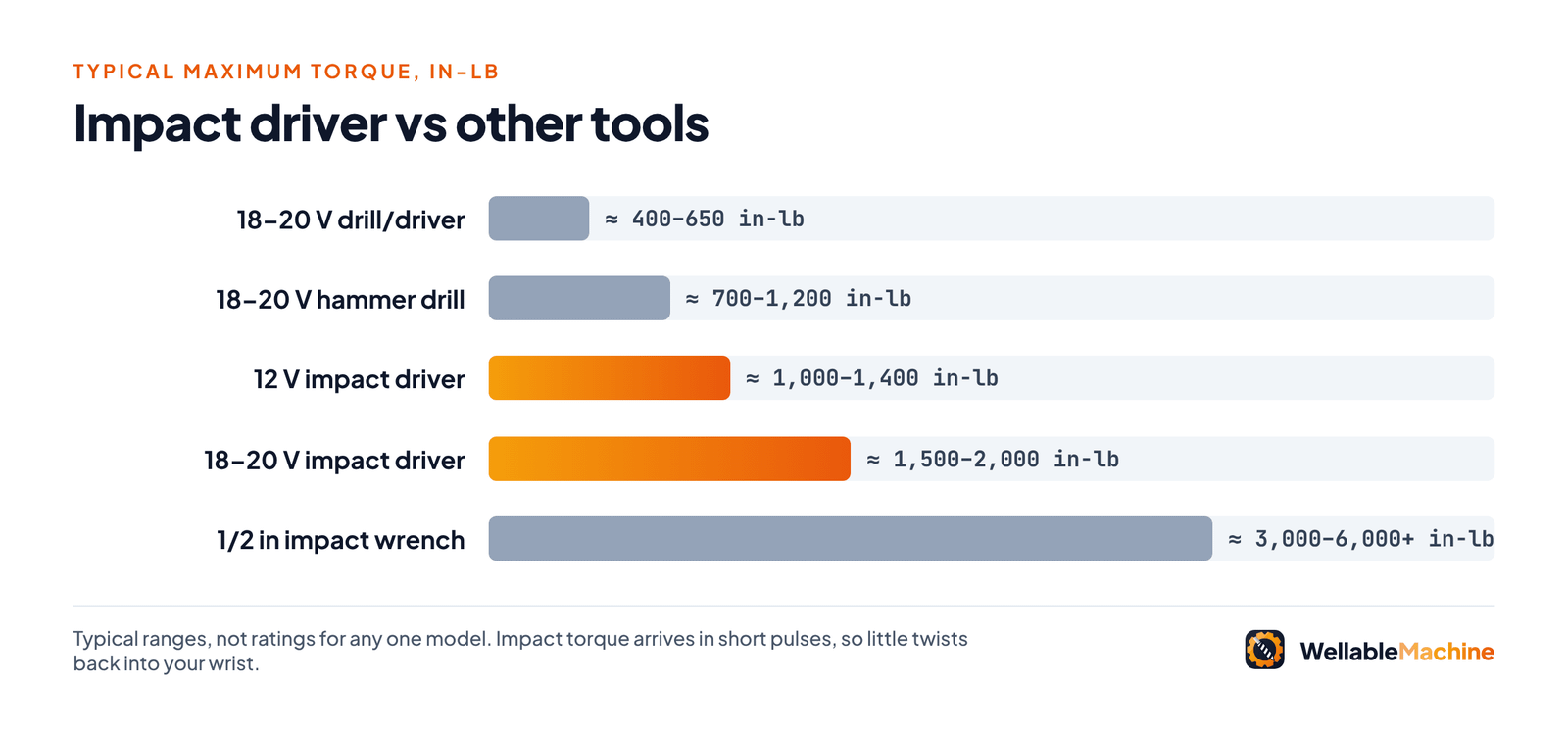
When there’s little resistance, an impact driver spins like a drill. As the screw tightens, a spring-loaded hammer inside the tool disengages from the anvil, spins ahead and slams back into it, two or three times per revolution. You’ll hear the change from a whir to a rapid clattering. Those impacts deliver much more torque than the motor could alone, but the force reaches the screw in short pulses, so very little of it comes back into your hand.
- Typical torque: compact 12 V models give about 1,000–1,400 in-lb; 18 V and 20 V models about 1,500–2,000 in-lb, far more than a drill/driver.
- Impacts per minute: usually 3,000–4,000 at full speed.
- No clutch: most impact drivers have no adjustable clutch. Torque control comes from your trigger finger and the speed setting.
If you’re still deciding which tool you need, our impact driver vs drill comparison explains when each one is better.
Bits and Accessories You’ll Need
- Impact-rated bits. They are made from tougher steel and often have a narrow “torsion zone” that flexes slightly to absorb each blow. Ordinary screwdriver bits can shatter in an impact driver.
- 1/4 in hex shank only. The collet takes 1/4 in hex shanks, not round shanks. Our guide to drill chuck sizes explains the difference.
- Bit holders and extensions: magnetic holders keep screws on the bit. Keep extensions short; long ones wobble and waste energy.
- Nut setters for hex-head screws and small bolts.
- Socket adapter (1/4 in hex to 1/4 in, 3/8 in or 1/2 in square drive) with impact sockets (black, thicker walls). Chrome hand sockets can crack.
- Hex-shank drill bits for drilling (more on that below).
Setting Up the Tool
- Charge and fit the battery, and check the direction switch is set to forward.
- Insert the bit. On most tools, pull the collet sleeve forward, push the bit in and release. On “one-handed” collets, just push the bit in until it clicks. Tug the bit to make sure it’s locked.
- Choose the speed or mode. Many drivers have three speed settings plus special modes (for example a self-tapping screw mode or an “assist” mode that starts slowly). Use low for small screws and soft materials, high for long screws and bolts.
- Match the bit to the screw. A worn or wrong-size bit is the main cause of stripped heads. Use the exact size (PH2, T25, square #2 and so on).
How to Hold an Impact Driver
- Keep the bit in line with the screw. Look from two directions if needed. Angled driving is the number one reason bits cam out and strip the head.
- Push firmly into the screw, using your body weight for long screws. Pressure keeps the bit in the head when the hammer starts.
- Use your other hand to steady the tool or the workpiece, but keep fingers away from the screw and bit.
- Feather the trigger. The trigger is variable speed. Start slowly until the screw bites, then squeeze harder.
How to Drive Screws With an Impact Driver

- Position the screw on the bit (a magnetic holder helps) and place the tip on your mark.
- Start slowly with light trigger pressure until the screw is about 1/4 in into the material and holds itself straight.
- Increase speed and keep steady pressure. The impacts will start as resistance builds.
- Slow down near the end. Ease off the trigger as the head approaches the surface.
- Stop when the head seats, or slightly below the surface for decking and framing. A second or two too long can snap the screw or drive it right through soft material.
Technique for Common Jobs
Deck screws
Impact drivers are the ideal tool for decking. Use star-drive (Torx) screws, which grip the bit much better than Phillips. On hardwood decking or near board ends, drill a pilot hole first to stop splitting; the pilot hole size chart lists sizes by screw gauge.
Structural and lag screws
Long structural screws (5 to 10 in) and 1/4 or 5/16 in lag screws are where impact drivers really earn their place. Use the highest speed setting, keep the tool straight and let the impacts do the work. For larger lag screws (3/8 in and up) in hardwood, drill a pilot hole for the threaded part and a clearance hole for the shank.
Drywall
Impact drivers will drive drywall screws, but it’s easy to sink them too deep and tear the paper. A drywall screw gun with a depth-setting nose, or a drill with the clutch set low, does a cleaner job.
Concrete screws
Concrete screws such as Tapcons drive well with an impact driver, but stop as soon as the head seats. Overdriving strips the thread in the concrete. Drill the right size hole first; our Tapcon drill bit size guide lists them.
Self-drilling metal screws
Use a low or medium speed (or a self-tapping mode) and a nut setter. Too much speed burns the drill point before it gets through the steel.
Small screws and hardware
Brass screws, cabinet hinges, hardware with #4 to #6 screws and electrical cover plates are poor jobs for an impact driver. Use a drill with the clutch set low, or a screwdriver.
Removing Screws and Bolts
Switch the direction to reverse and use the same technique: straight in line, firm pressure, gentle start. The impacts are very good at breaking loose stuck screws and rusty bolts, often better than a drill. For a damaged screw head, our guide to removing a stripped screw shows what to try next. For rusted nuts and bolts, an impact socket on the driver often frees them without rounding the corners.
Can You Drill With an Impact Driver?
Yes, for many jobs, as long as you use hex-shank bits:
- Wood: hex-shank twist bits, spade bits and impact-rated auger bits work well. Impact-rated spade bits are especially fast.
- Thin metal: impact-rated twist bits and step bits work in sheet metal. Keep the speed moderate.
- Thick metal and precise holes: a drill is better. The hammering action makes holes slightly oversize and rough, and it’s hard on small bits.
- Masonry: an impact driver is not a hammer drill. Its impacts are rotational, not forward, so it drills concrete very slowly. Use a hammer drill; see hammer drill vs drill.
Common Mistakes
| Mistake | What happens | Fix |
|---|---|---|
| Using non-impact bits | Bits snap or shatter | Use impact-rated bits and sockets |
| Driving at an angle | Bit cams out, head strips | Keep the bit in line with the screw |
| Too little pressure | Bit jumps out of the head | Push firmly, especially once impacts start |
| Full speed on small screws | Snapped screws, stripped holes | Use low speed or a drill with a clutch |
| Driving too long | Screw heads pull through, wood splits | Stop as soon as the head seats |
| Using it as a hammer drill | Very slow progress in concrete | Use a hammer drill or rotary hammer |
Safety
- Hearing protection. Impact drivers are loud, often around 95–100 dB, especially in the impact phase. Use ear protection for anything more than a few screws. The NIOSH noise guidance explains why repeated exposure matters.
- Eye protection for overhead work and when bits can snap.
- Keep hands clear of the bit, and never hold a small part in your hand while driving into it.
- Check for hidden wires and pipes before driving long screws into walls and floors.
Taking Care of an Impact Driver
- Blow dust out of the vents regularly, especially after drywall or sanding.
- Store batteries at partial charge and away from heat.
- Replace worn bits; a rounded bit tip strips screws.
- If the collet gets stiff, clean it and add a drop of light oil.
- Brushless models run cooler and last longer; see brushless vs brushed drills.
Frequently Asked Questions
6 quick answers from our editors
01How do I put a bit in an impact driver?
Pull the collet sleeve forward, push in a 1/4 in hex-shank bit and release the sleeve. Many newer tools lock the bit automatically when you push it in.
02Can I use regular drill bits in an impact driver?
Only if they have a 1/4 in hex shank. Round-shank bits won’t fit the collet. Impact-rated bits are best because they’re made to handle the impacts.
03What speed should I use on an impact driver?
Low for small screws, soft materials and starting screws; high for long screws, lag bolts and loosening stuck fasteners.
04Why does my impact driver strip screws?
Usually because the bit is worn, the wrong size, held at an angle, or there isn’t enough pressure. Running at full speed on small screws also strips them.
05Can an impact driver loosen bolts?
Yes. With a hex-to-square socket adapter and impact sockets, it breaks loose many bolts. For large, heavily rusted bolts, use an impact wrench.
06Is an impact driver good for drilling holes?
It’s fine for most holes in wood and thin metal using hex-shank bits. For precise holes in metal and for masonry, use a drill or hammer drill.
Bottom Line
Use impact-rated 1/4 in hex bits, choose a low speed for small screws and high for big ones, keep the tool straight and pressed firmly into the screw, start gently, and stop the moment the head seats. An impact driver is the best tool for deck screws, lag and structural screws and stuck fasteners. Keep a drill with a clutch for small, delicate screws, accurate metal holes and anything in masonry.