Makita XDT16Z Review: 18V LXT Quick-Shift 4-Speed Impact Driver
This review contains affiliate links. If you buy through them, WellableMachine may earn a commission from Amazon at no extra cost to you. It doesn’t change our verdict. Read our disclosure.
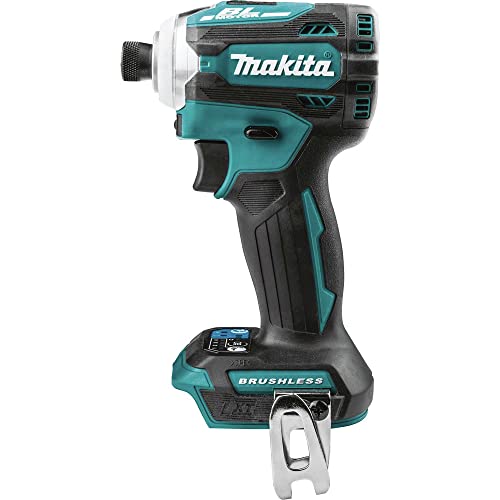
Quick verdict: the Makita XDT16Z is an 18V LXT brushless impact driver with 1,600 in-lbs of torque and up to 3,600 rpm. Its Quick-Shift mode uses the motor electronics to balance speed and torque automatically, and four speed settings give manual control. Assist mode drives at low speed until tightening begins, which helps stop cross-threading. A second speed button under the chuck lets you change speed without looking. It carries Makita’s 3-year warranty.

Best smart-mode LXT impact driver
Makita XDT16Z 18V LXT Brushless Quick-Shift Mode 4-Speed Impact Driver (Tool Only)
★★★★½ 4.5 / 5
- 1,600 in-lbs, 3,600 rpm
- 4 speeds plus Quick-Shift
- Assist mode for cross-threading
- One-touch speed button
How We Reviewed the Makita XDT16Z
We compared the Makita XDT16Z against the specs and features that matter for this type of tool, using the manufacturer’s published specifications, the current Amazon listing data, and the same technical standards we use in our drilling guides. We didn’t receive a free sample, and the score reflects value for the buyer, not commission. See our editorial policy for how we write reviews.
Makita XDT16Z Specifications
| Specification | Makita XDT16Z |
|---|---|
| Platform | Makita 18V LXT |
| Motor | BL brushless |
| Max torque | 1,600 in-lbs |
| Max speed | 0–3,600 rpm |
| Impacts | 0–3,800 IPM |
| Speeds | 4 + Quick-Shift + Assist |
| Weight | ~1.5 lb (listing) |
| Warranty | 3-year limited |
Quick-Shift Explained
Quick-Shift mode starts a fastener at high speed and automatically shifts to a better speed and torque balance as resistance builds. In practice, long screws drive faster with less risk of snapping the head. It works best in wood framing and decking.
Assist Mode
Assist mode drives slowly until the fastener starts to tighten, then speeds up. That makes it easier to start machine screws and bolts without cross-threading, and it reduces “screw came out” moments when starting screws in the air.
Four Speeds Compared
Speeds range from 1,100 to 3,600 rpm. Speed 1 is for small screws and delicate materials, speeds 2 and 3 for general work, and speed 4 for maximum power. The one-touch button under the chuck makes switching quick.
What We Like
Smart modes
Quick-Shift and Assist.
4 speeds
Lots of control.
Two speed buttons
Easy changes.
LXT platform
Huge range.
What We Don’t Like
Tool only
Battery extra.
Modes take learning
More to remember.
Not the top torque
XDT19 has more.
Pros and Cons
| Pros | Cons |
|---|---|
| 1,600 in-lbs | Bare tool |
| 4 speeds | Learning curve |
| Quick-Shift | Less torque than flagship |
| Assist mode | |
| 3-year warranty |
XDT16Z vs XDT13Z
See our XDT13Z review.
Tips
- Use Assist mode to start bolts.
- Use Quick-Shift for long screws.
- Use speed 1 for cabinet screws.
- Pair with 3.0–5.0Ah LXT packs.
Makita XDT16Z in Real-World Jobs
Decking
Quick-Shift drives long screws fast.
Machine screws
Assist mode prevents cross-threading.
Finish work
Speed 1.
Common Problems and Fixes
| Problem | Likely cause | Fix |
|---|---|---|
| Stripping | Too fast | Speed 1 |
| Cross-threading | Fast start | Assist mode |
| Short runtime | Small pack | Use 5.0Ah |
| Bit snaps | Cheap bit | Impact-rated |
| Wrong mode | Button bumped | Check display |
Buying Checklist
- LXT user.
- Want smart modes.
- Mixed fastening.
- Need control.
Our Scorecard
| Area | Score | Why |
|---|---|---|
| Power | 4.5/5 | 1,600 in-lbs |
| Control | 5/5 | 4 speeds + modes |
| Comfort | 4.5/5 | Compact |
| Value | 4/5 | Bare |
| Warranty | 4.5/5 | 3-year |
Scores are based on published specs, the listing, the warranty and how the product compares with rivals in its class. They are not lab results.
Caring for Your Makita XDT16Z
- Clean the anvil or hex collet regularly.
- Replace worn friction rings, detent pins and bits before they fail.
- Use only impact-rated sockets and bits.
- Store batteries at room temperature.
- Blow dust from the vents.
Who Should Buy It?
- LXT users.
- Deck builders.
- Finish carpenters.
Who Should Skip It?
- Non-LXT users.
- Simple needs.
- Max torque seekers.
Frequently Asked Questions
5 quick answers from our editors
01How much torque does the Makita XDT16Z have?
1,600 in-lbs.
02What is Quick-Shift mode?
An auto speed/torque balancing mode.
03What is Assist mode?
It drives slowly until tightening begins.
04How many speeds?
Four.
05Is a battery included?
No, tool only.
Bottom Line
The Makita XDT16Z is a smart, controllable LXT impact driver for people who like the right speed for every screw.
Check the Makita XDT16Z Price on Amazon
As an Amazon Associate, WellableMachine earns from qualifying purchases. Product details come from the manufacturer and Amazon and may change. Check the Amazon listing for the current price and availability. Specs from Makita’s Amazon listing. See the official Makita site.